
How Can We Help?
Budget Reports
The Budget Reports provides a detailed view of budget tracking for categories where budgeting was enabled and values were entered during their creation. Access this feature from the Reports screen. Upon opening, the screen will appear as shown in the visual.
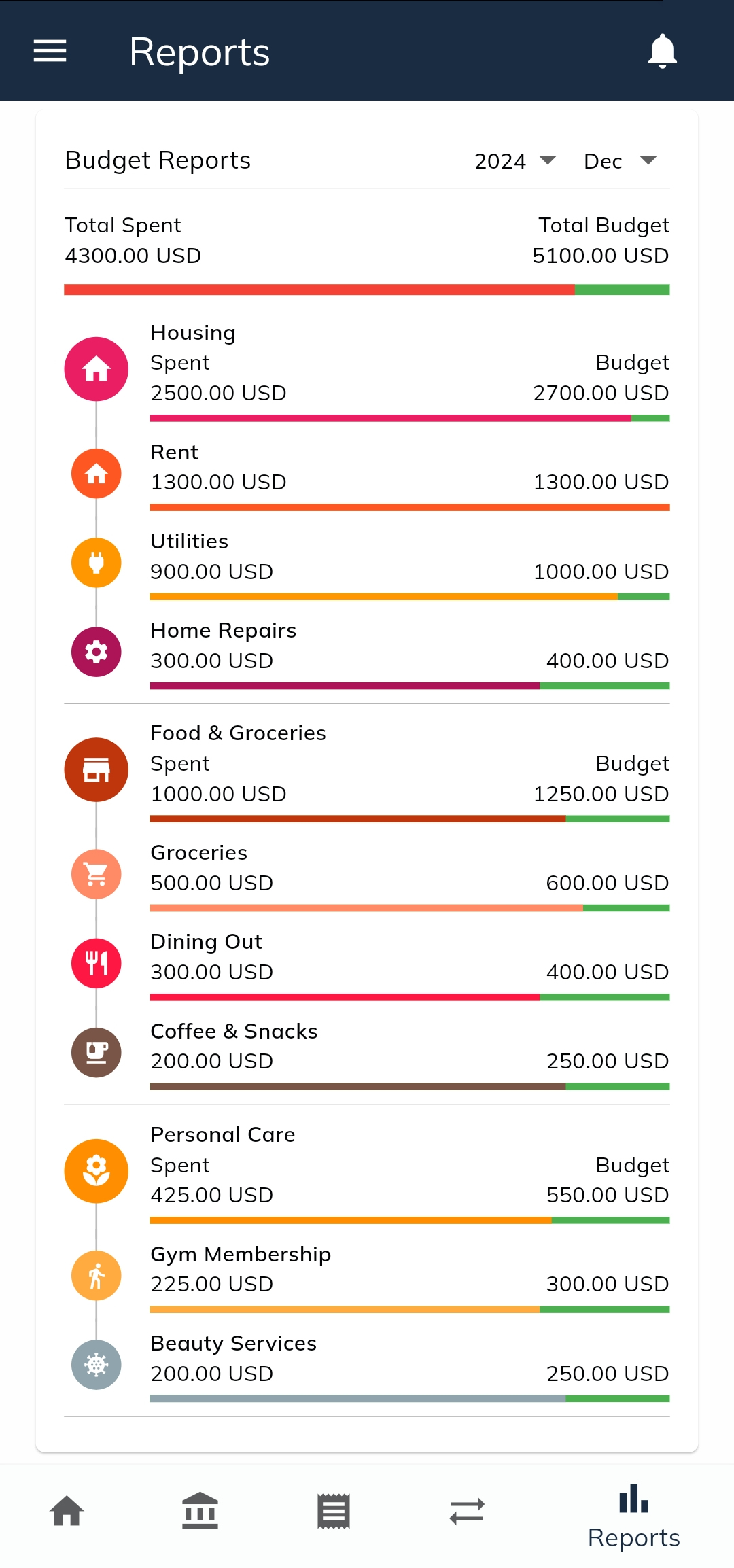
- Selecting a Year and Month
- On the right side of the screen, you can select the year and month for which you want to view the budget report.
- The report will be updated in real-time to reflect the selected time period.
- Overall Summary
- At the top of the report:
- Total Spent (left): Shows the total amount spent across all categories where budgeting is enabled.
- Total Budget (right): Displays the total budgeted amount for all categories.
- A linear progress bar visualizes the proportion of the budget spent.
- At the top of the report:
- Category Breakdown
- Beneath the summary, all parent categories and their associated subcategories (if any) are listed.
- For each parent category:
- Spent and Budget values are calculated as the sum of all its subcategories.
- The spent amount and budget for each category are displayed alongside the category name.
- A progress bar visually represents the spent amount, with the bar color matching the category color selected during its creation.
- Subcategories (Premium Feature)
- Subcategories are a Premium feature, available only to Premium users.
- If you are not a Premium user, you will still see the budgeted values for each parent category in the same format but without subcategories.
- Transaction Details
- Tapping on a category opens a detailed page showing all transactions recorded for that category during the selected month.
- This feature allows you to review and analyze the specific transactions contributing to the budget usage for that category.
The Budget Reports section is designed to give you a clear overview of your financial performance against your set budgets. Its intuitive layout and visual progress bars make it easy to monitor and manage your spending across all categories.