
How Can We Help?
Accounts Screen
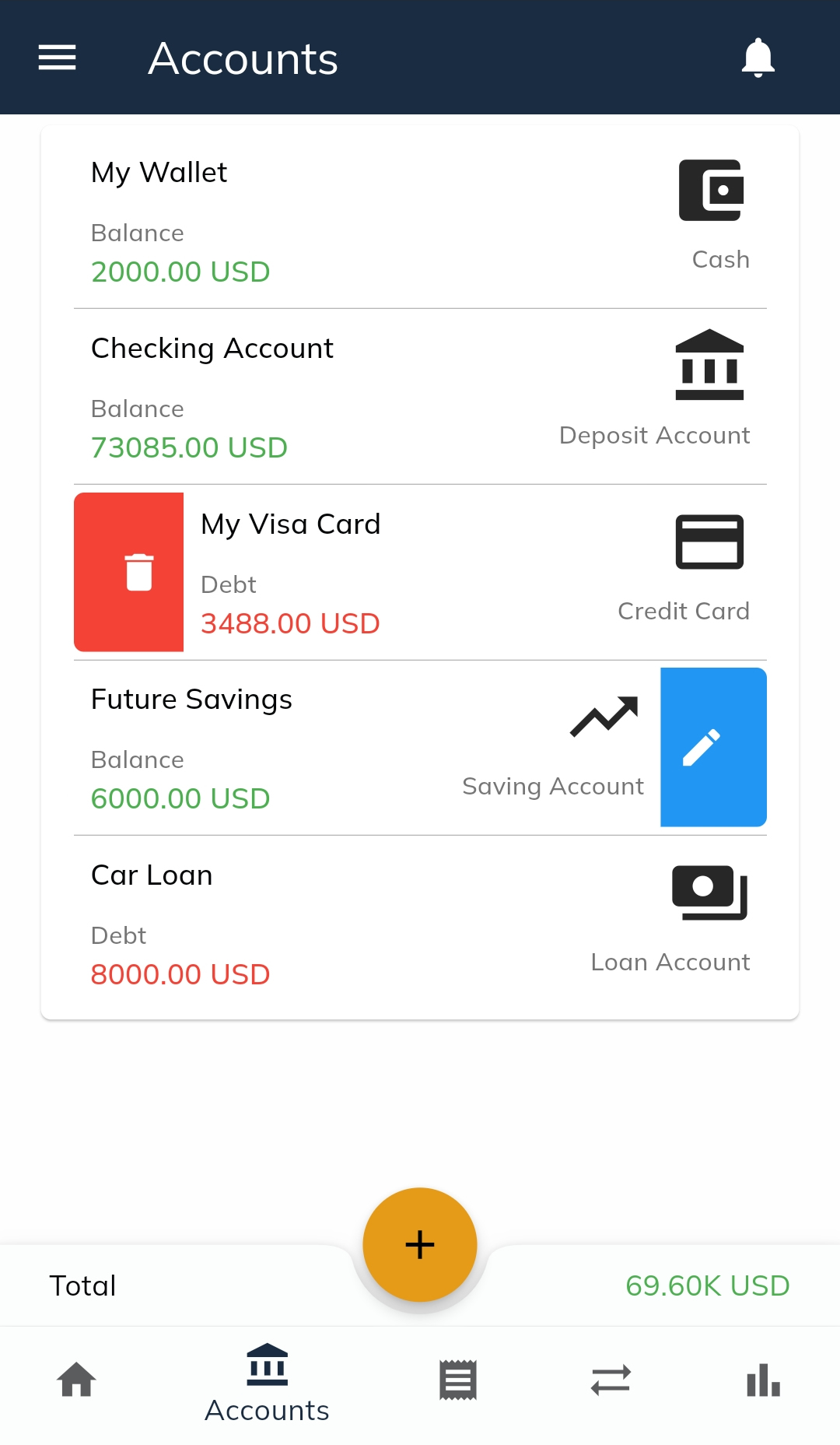
The Accounts Screen in Finanzy displays all the accounts you’ve added to the app. You can view, edit, or delete accounts from this page. As shown in the visual, all accounts are listed with their details.
Features and Details
- Account Information Display
- Each account shows:
- Account Name
- Balance Value (or Debt Value for specific account types)
- Account Type
- Each account shows:
- Balance Display
- For Cash, Deposit Account, and Saving Account types:
- Positive balances are displayed in green.
- Negative balances are displayed in red.
- For Credit Card and Loan Account types (debt accounts):
- If the account has debt, the Debt value is shown in red.
- If there is no debt and the balance is positive, it is displayed in green.
- For Cash, Deposit Account, and Saving Account types:
- Total Balances
- The total value of all accounts is displayed at the bottom-right corner of the screen.
Actions on the Accounts Screen
- Delete an Account
- To delete an account, hold the account and swipe right. The delete options will appear:
- Delete with Transactions: Deletes the account along with any income or expense records associated with it.
- Deactivate Account: Keeps the income and expense records but hides the account from the app. This is useful if you no longer want the account visible but still need the associated data for past transactions.
- Important Note: If the account is involved in transfer transactions, these cannot be deleted, as transfers impact the balances of other accounts.
- To delete an account, hold the account and swipe right. The delete options will appear:
- Edit an Account
- To edit an account, hold the account and swipe left. This opens the Account Edit Screen.
- On the edit screen, only the Account Name can be changed. Other fields, such as account type, balance, or currency, cannot be modified to maintain the accuracy of financial records.
- Important Note: If you need to change the account type, balance, or currency, the only way is to delete or deactivate the existing account and create a new one with the updated details.
The Accounts Screen provides a comprehensive overview and management options for your accounts, ensuring that financial data is displayed accurately while maintaining the integrity of your records.